
Raging Netflix Queue, a Google Chrome Extension
The premise is simple. When attempting to find movies to watch in my local theater, I often stumble upon titles that I feel to be more rental quality than theater quality. So I wanted an easier way to add those movies to my Netflix queue. I created a Google Chrome extension to accomplish just that.
[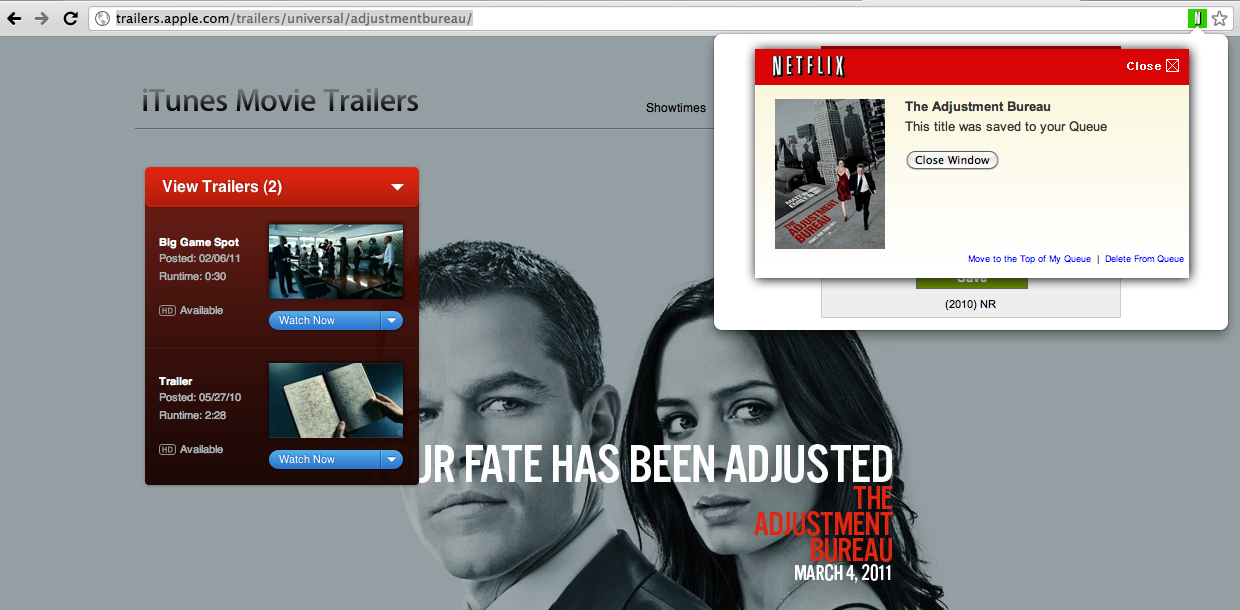 ][2]When Raging Netflix Queue recognizes the site you’re browsing to be a movie web site, it will show a small green Netflix icon in the address bar. Clicking that icon will add the title to your queue. If the title is available for Instant Viewing, it will go into your Instant Queue. If not available for Instant View, it will go into your DVD Queue. If the title is still in theaters and not yet available on DVD, it will go into the Saved portion of your DVD Queue, and Netflix will automatically add it to your DVD Queue when it becomes available.
Raging Netflix Queue supports Rotten Tomatoes, IMDB, Google Movies, Apple Trailers, Movie Fone, movies.com, Yahoo Movies, and Fandango. Let me know if you have others you’d like to see added.
Download Raging Netflix Queue
https://chrome.google.com/extensions/detail/nbnnepgogimidfbfkbcfmdeimmfadmmp This project is no longer available for download: Netflix retired the API.
Screencast
Hiccups
Years
The extension will parse the release year from the movie page, in order to guarantee better accuracy of results (There are a ton of remakes out there with the same titles). However, the actual year may vary. Some sites report theater release date, while others DVD release date, or the movie may have gone through a small showing and then a larger showing later. Thus, we allow plus or minus one year leverage when searching Netflix. See Cedar Rapids (2011) on Rotten Tomatoes.
Use of “The” or And/&
Apple’s entry for The Adjustment Bureau does not include “The” in the title. While this would be solved if Netflix allowed partial name matches in their OData API, Raging Netflix Queue does an additional search prepending “The” to the title, if no titles were found on the first go.
Netflix requires exact name matches in their API and prefers “and” over “&” in my tests. Raging Netflix Queue does a simple string replace there.
Single Quotes
Titles like “The King’s Speech” don’t match, due to another limitation with the Netflix OData API. There is no way to escape single quotes in the query string. I’m waiting on Netflix for an answer there.
Hindsight
It’s true that I have built a web browser plugin (to an add-on) before, and even a plug-in to a ported web browser add-on, but it was a great experience to build an actual web browser extension and Google Chrome has made it very easy to do so. This was also a jQuery-free project, as I would think that all Google Chrome extensions would be. jQuery is intended to solve cross browser compatibility issues, and a web browser specific extension shouldn’t have any of those. Sure, it feels like you’re being spoiled to use native String trim(), Array forEach, and document.querySelector. But damn it, I deserve nice things every once in awhile.
8 Comments
Cody Peterson Disqus
21 Feb 2011Andy Stetson Disqus
22 Feb 2011Les Chaps Disqus
23 Feb 2011Zach Leatherman Disqus
05 Mar 2011RJ Disqus
18 Apr 2011Eric Kissack Disqus
29 Apr 2011Zach Leatherman Disqus
07 May 2011