
Ruthlessly Eliminating Layout Shift on netlify.com
Updated on 17 November 2023 to simplify the CSS to use :defined
On the Netlify web site, we have a little banner that appears at the top to drive traffic to new and exciting things happening in Netlify-land.

That banner has exactly two features:
- An advanced HTML feature known only to a select few Old Guard developers: the hyperlink.
- A close button (which saves the preference for future page loads)
There are a few key performance milestones in the lifecycle of this component, and this is how worked previously:
- The page’s initial render. The banner is ⚠️⚠️⚠️ hidden by default. Without JavaScript or before JavaScript loads, the banner is hidden.
- After the JavaScript loads, we check
localStorageto see if the user has closed the banner previously. We hash this preference to the banner URL so that if the banner changes, it will render even if the user has opted out previously. If applicable, render the banner. - Lastly we bind JavaScript events to the close button. Events are not necessary for the hyperlink, because its behavior is delivered exlusively in HTML (very much wow).
Steps 2 and 3 were bundled and executed together in the same component code file. And in some earlier iterations of the site, up the amount of time that elapsed between Step 1 and 2 could be up to ~600 ms.

On our new site (faster, mind you) redesign we inlined the JavaScript for Steps 2 and 3 into the end of the <body> and the delay was still very present:

The fix
What we needed to do was swap the behavior. The common use case was to visit the site without the opt-in preference to hide the banner. We must make the banner visible by default and make the JavaScript path to hide it the exception to the rule.
This changes our previously mentioned Step 1, the page’s initial render, show the banner. Without JavaScript or before JavaScript loads, the banner should be visible.
We also split the JavaScript code for the component into two separate pieces: one piece to check whether or not the user has the preference to hide and a separate Web Component to bind the events.
Update: I’ve packaged up the code below and put it on GitHub for re-use.
CSS and HTML
We use opacity to toggle the close button so that it doesn’t reflow the component when it’s enabled via JavaScript.
.banner--hide announcement-banner,
announcement-banner[hidden] {
  display: none;
}
/* The close button will not be visible until the component is registered,
 * preventing ghost clicks on the button before the event listener is added.
 */
announcement-banner:not(:defined) [data-banner-close] {
  opacity: 0;
  pointer-events: none;
}<announcement-banner>
<a href="https://www.netlify.com/sustainability/">Read about our Sustainability</a>
<button type="button" data-banner-close>Close</button>
</announcement-banner>JavaScript
banner-helper.js, put into the <head>:
// the current banner CTA URL, we inject this from a JSON data file
let ctaUrl = "https://www.netlify.com/sustainability/";
let savedCtaUrl = localStorage.getItem("banner--cta-url");

if(savedCtaUrl === ctaUrl) {
  document.documentElement.classList.add("banner--hide");
}banner.js, defer this until later (how much later is up to you):
class Banner extends HTMLElement {
  connectedCallback() {
    let button = this.querySelector("[data-banner-close]");
    if(button) {
      button.addEventListener("click", () => {
        this.savePreference();
        this.close();
      });
    }
  }

  savePreference() {
    let cta = this.querySelector("a[href]");
    if(cta) {
      let ctaUrl = cta.getAttribute("href");
      localStorage.setItem("banner--cta-url", ctaUrl);
    }
  }

  close() {
    this.setAttribute("hidden", true);
  }
}

window.customElements.define("announcement-banner", Banner);
Astute readers will notice that the above is a web component but let’s just keep that between us.
The Results
Note that the first render contains the banner! This is the same render behavior whether or not JavaScript is in play.
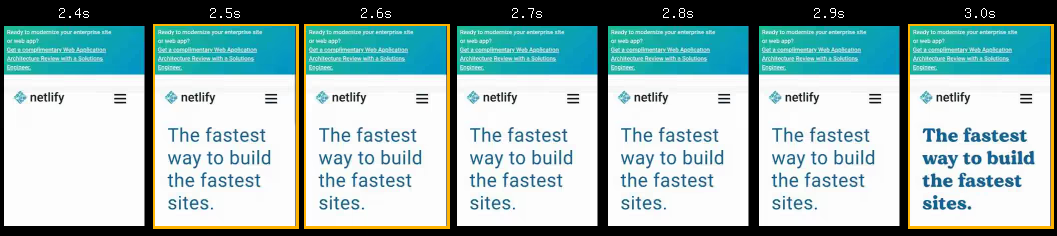
In this waterfall comparison, you might note that we reduced layout shift metrics to zero.

And because we inlined the script for repeat views into the <head>, when you hide the banner and navigate to a new page, the banner will be hidden before first render too.
Not too bad for a few small changes!
Next target will be to improve the web font render.

